
Web access
What it shows
Section titled “What it shows”pi reaches the web through two tools Enso adds, and through nothing else:
web_fetchfetches one URL and returns the page as text. It fetches only hosts you have allowed.web_searchsearches the web. It uses the current model’s own search when the model has one, and can fall back to Tavily.
curl, wget and other network clients in the shell are refused by a guard, and the refusal tells pi to use web_fetch instead.
How to open it
Section titled “How to open it”-
The allowlist lives in your config,
ENSO_HOME/config.json(~/.enso/config.jsonby default). Name each host exactly:{ "webFetch": { "allowedHosts": ["docs.example.com"] } } -
A project you trust can add hosts for its own threads in its
.enso/config.json. Either way, the list is read when a session starts, so restart the thread after you change it. -
For the Tavily fallback, put
TAVILY_API_KEYinENSO_HOME/secrets.env. It is read on every call, so no restart is needed.
What it looks like
Section titled “What it looks like”To see it: open a thread from the rail, then choose web_fetch https://bun.sh/blog.
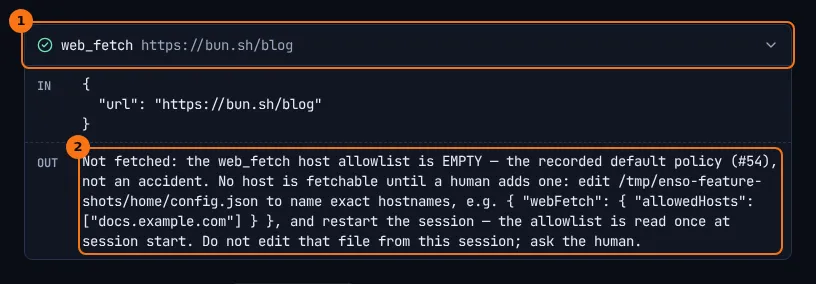
- The
web_fetchcall, and the URL pi asked for. - The answer pi got. It says why nothing was fetched, which file to edit, and the JSON to put in it.
What to look for
Section titled “What to look for”In the thread above, pi first tried curl https://bun.sh/blog and the network-egress guard refused it. pi then used web_fetch, which fetched nothing either, because the allowlist is empty. That is the default, not a mistake: until you add a host, nothing is fetchable. pi’s answer passes the fix on to you (Add bun.sh to webFetch.allowedHosts) instead of trying another way round.
Note the difference in the chat. The curl refusal is a guard receipt. The web_fetch refusal is an ordinary result with a check mark: the tool worked, and its answer is “not fetched”.
A host that is not on the list gets its own answer, naming the hosts that are. Matching is exact: allowing example.com does not allow docs.example.com.
For web_search, the first line of every result names the backend that answered and, when it fell back to Tavily, why. When a model answers without searching and Tavily is not set up, the result says no web search was performed.
What it doesn’t do
Section titled “What it doesn’t do”web_fetchnever follows a redirect. It reports where the redirect points, so you can allow that host too.- It fetches text only, at most 512 KB, within 30 seconds, over
httporhttps, and never a URL with a password in it. - pi cannot widen its own allowlist. Writes into
ENSO_HOMEand into a project’s.enso/are refused by the guards, shell redirects included. - A page’s text is marked as untrusted before pi reads it. That is a warning to the model, not a filter: a fetched page can still try to give pi instructions.
- The check that a host resolves to a public address is advisory. It is not a network boundary.
Go deeper
Section titled “Go deeper”- Web providers seam: the backends behind
web_search, and when each is chosen. - A web_search call: step by step.
- Environment and configuration:
webFetchandwebSearchinconfig.json. - Guards and receipts: the
network-egressrule.