
Diff Viewer
What it shows
Section titled “What it shows”The Diff Viewer tab steps through the thread’s prompts, one at a time, and shows the files that changed while each prompt ran: the prompt and everything pi did for it, up to the next prompt. The files are compared as Enso’s snapshots recorded them: the files as the prompt’s run began, against the files as the next prompt’s run began.
Two views of a prompt: This prompt shows what changed while it ran, and Up to this prompt shows everything that changed from the thread’s baseline to the end of it. The baseline is the snapshot the thread’s tree was made from. A fork’s baseline is the snapshot it inherited at the fork point, named in the header, and the prompts it inherited from its source are not listed: they are the source’s.
It is not the Diff tab. The Diff tab compares the files now with the last push; the Diff Viewer compares two snapshots, so a prompt shows what it showed while pi runs on, or after you change the files yourself.
It counts prompts. A turn is something else: one model request, as the Stats tab counts it, and one prompt’s run holds several.
How to open it
Section titled “How to open it”- Open a thread from the rail, then choose the Diff Viewer tab at the top of the thread.
- Step with Previous and Next, or choose a prompt in the row of prompt numbers. Show in Chat opens the prompt in the transcript.
What it looks like
Section titled “What it looks like”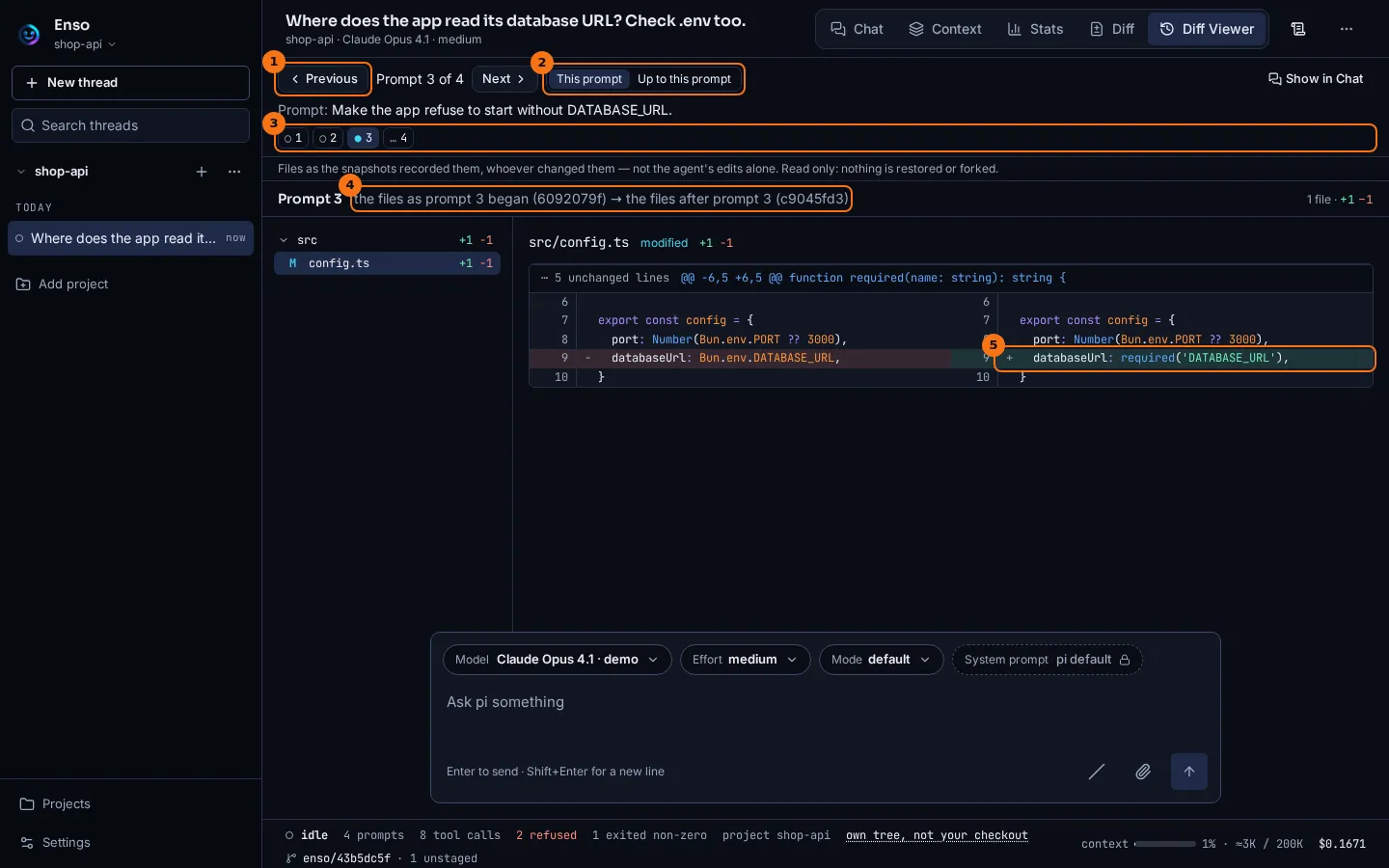
- Step to the prompt before or after. The count says which prompt this is, of how many.
- What the diff compares: this prompt’s run alone, or the thread’s baseline up to the end of it.
- Every prompt, marked by what its run holds:
●files changed,○no files changed,?a snapshot missing,…not captured yet. - The two snapshots compared, each by its short hash:
the files as prompt 3 began (6092079f) → the files after prompt 3 (c9045fd3). - The prompt’s change, side by side, as on the Diff tab.
What to look for
Section titled “What to look for”The third prompt asked pi to make the app refuse to start without DATABASE_URL, and its run holds that one edit: src/config.ts, where Bun.env.DATABASE_URL became required('DATABASE_URL').
The first two prompts only read, so they are marked ○: their two snapshots hold the same files, and choosing one says so rather than showing an empty diff. The last prompt is marked …: its result is captured when the next prompt begins.
A prompt whose snapshot is missing says why: the run could not take one, the thread ran before snapshots existed, or the store no longer holds it. It never shows a diff in its place.
What it doesn’t do
Section titled “What it doesn’t do”- It shows what changed on disk, not who changed it. An edit pi made, a formatter run through
bashand your own editor’s save all count, and a restore while the prompt ran is marked as part of it. - It reads only. Stepping through prompts restores nothing and forks nothing: those are the buttons under a prompt in Chat. See Thread trees and Forks and lineage.
- A prompt’s result is the snapshot the next prompt’s run begins with, so the last prompt has none until another prompt is sent.
- It does not include files a snapshot never takes: those the project ignores, such as
.env, and an untrackednode_modules.
Go deeper
Section titled “Go deeper”- Routes:
GET /api/threads/:threadId/prompt-runs,GET /api/threads/:threadId/prompt-runs/changesandGET /api/threads/:threadId/prompt-runs/file. - Thread trees: where the snapshots come from, and restoring a thread’s files to a prompt.