
Thread trees
What it shows
Section titled “What it shows”Each new thread works in a tree of its own, not in your checkout. When the project is a git repository’s top level, the tree is a git worktree on a branch of its own, enso/<thread-id>; otherwise it is a copy of the project. It starts from your checkout as you left it, uncommitted edits and untracked files included, never your ignored files such as node_modules or .env. pi’s file tools stay inside it, so one thread cannot write into another thread’s files, or into yours.
A project says how its new trees are prepared, on its own page: Project settings… in the project’s menu on the rail, or Settings on its card on the Projects page, opens its Worktree settings tab (#871). Files to copy into a new tree names ignored files such as .env to copy in from your checkout, and Setup commands run in each new tree, in order, before its first run: an install, so the project’s tools, and its git hooks, work there. New threads run in set to off keeps the project’s new threads in its folder, with no tree. Each value says where it comes from: your settings, the project’s shared .enso/config.json, committed with it, or .enso/config.local.json, yours alone. Save changes to names the file a change goes in before you save: Only me — this project (.enso/config.local.json) or Shared — committed with the project (.enso/config.json) (#754).
At the start of every run, Enso takes a snapshot of the tree. Restore files to here, under any prompt you sent, puts the tree’s files back to how they were when that prompt ran. The conversation is not changed, but your next prompt tells pi the files went back, and to which prompt, so it doesn’t work from files that are gone (#652). The files the restore replaced are kept: Undo last restore puts them back. A fork made at a prompt gets a tree of its own, at that prompt’s snapshot.
Deleting a thread removes its tree, its branch and its snapshots, after checking what the tree still holds. Settings → Storage lists every tree with what it takes on disk, and each project’s group opens that project’s Storage tab, which lists its trees alone.
How to open it
Section titled “How to open it”-
Open a thread from the rail: the status bar says where the thread’s edits land. Trees are on by default.
-
To keep threads in your checkout, set New threads run in to
offon the project’s page, or turn trees off inENSO_HOME/config.json, for every project or for one:{ "threads": { "tree": "off" } }{ "threads": { "projects": { "~/code/big-repo": "off" } } }A trusted project’s own
.enso/config.json, and your.enso/config.local.jsonbeside it, set the same keys for that project, and win over yours: the local file first, then the shared one (#754). Trust a project, or revoke it, from its page: the confirmation lists the setup commands its files declare before anything is trusted, and the change applies to the next tree (see Sessions and projects, #873). A launch that relies on the default says so in its log. -
Restore files to here is under each prompt you sent, beside Fork from here.
-
Settings → Storage lists the trees: Settings is at the foot of the rail. Delete thread… in the header’s thread actions menu (⋯) deletes the thread on screen, through the same confirmation.
What it looks like
Section titled “What it looks like”
- own tree, not your checkout: this thread’s edits land in its tree. Your checkout is not touched. Click it to see where the tree is and what it built.
- The tree’s branch, and its state: the git readout is the tree’s, not your checkout’s.
Restore files to here, under a prompt, first asks: the thread’s files go back to how they were at that prompt, the conversation is not changed (pi is told on your next prompt), and the current files are kept as a safety snapshot. Once it is done, a notice names both snapshots, with Undo last restore, which puts the files from before back.
What this thread built opens from the bar’s own tree, not your checkout, and from Preview beside it once the tree holds an HTML page: the tree’s full path, with Copy path, and the HTML pages at its top two levels. Open preview opens a page in a new tab, served from the tree as it is now, so you can try what the thread built.
To see it: open a thread from the rail, then choose Settings, then choose Storage.
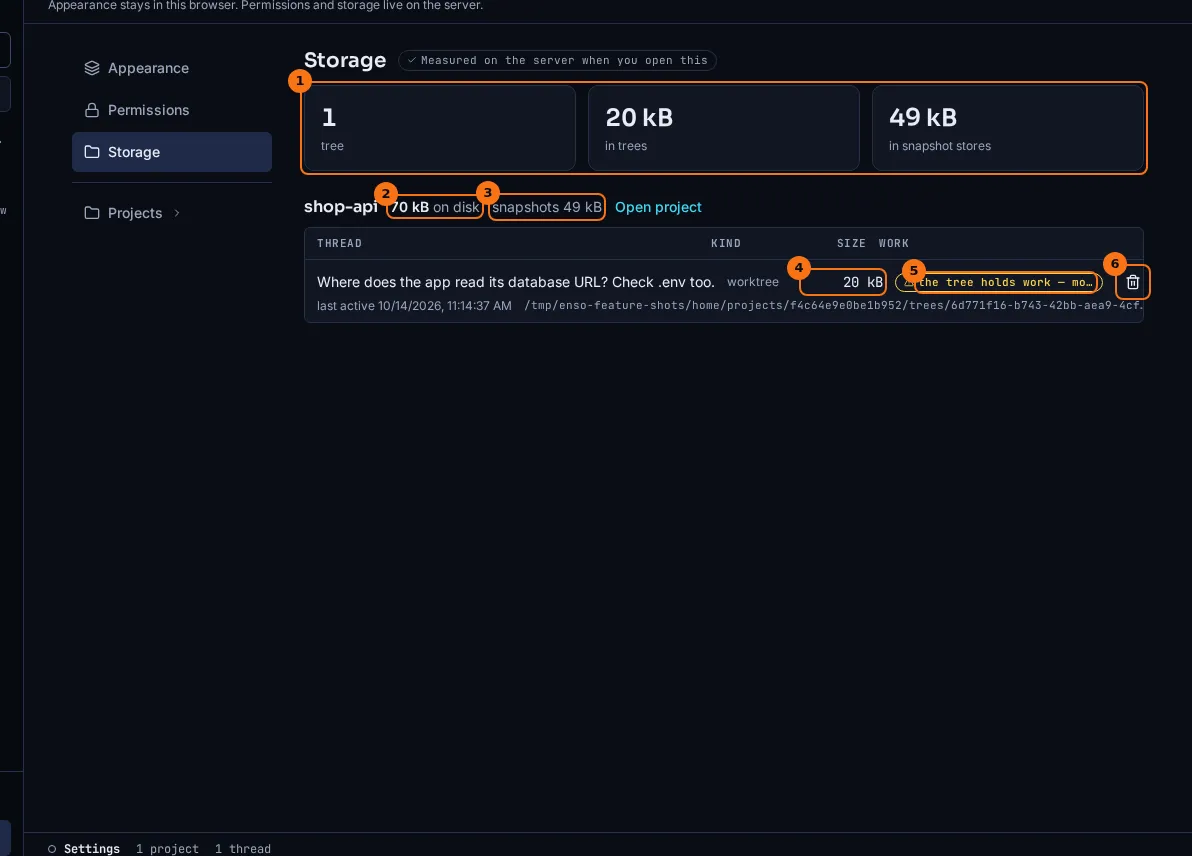
- The totals across every project: how many trees, what they take, and what the snapshot stores take. A sum with a size not fully read says
at least, and how many were not. - 70 kB on disk: the project’s trees plus its snapshot store, the same number its card on the Projects page says.
- snapshots 49 kB: the project’s snapshot store, shared by all its threads’ snapshots.
- What the tree takes on disk, ignored files and installs included. Trees are listed largest first.
- What deleting it would refuse for, in the delete’s own words;
cleanwhen nothing. - Deletes the thread, through the same confirmation as the thread menu’s Delete thread….
The trash icon opens the delete confirmation: what goes (the conversation, the tree by path and branch, and what it takes on disk), and the work deleting would lose, named before anything goes. Delete anyway deletes exactly that work; work the tree gained since is named again first.
What to look for
Section titled “What to look for”The tree’s branch, enso/6d771f16, is a real branch in your repository. git worktree list and git branch in your checkout show it for as long as the thread exists.
The demo thread’s edit is in its tree only: the checkout it started from is as it was. That is why its row above names work. The edit is uncommitted, on the tree’s own branch.
The tree above takes 20 kB, since the demo project is tiny. A tree holds every tracked and unignored file, plus whatever pi installs or builds in it, so a JavaScript project’s tree is often hundreds of megabytes once node_modules is in it. Sizes are counted as du counts them, under a time limit: a count that was cut short says at least, and why.
A delete is refused while the tree holds work you would lose: untracked or modified files, a change the last snapshot doesn’t have, a commit no other branch reaches. Delete anyway deletes exactly the work it named.
What it doesn’t do
Section titled “What it doesn’t do”- Nothing brings a tree’s work back into your checkout yet. For a worktree,
git merge enso/<thread-id>brings what was committed. Uncommitted edits, and everything in a copy, you copy over yourself. - A tree has none of your ignored files until the project’s setup copies them in or recreates them. With no setup configured, a build or a test may need its install step first.
- Setup commands run on your machine, as you, whenever a tree is made. The project’s own files are read only once you trust the project, and only as you approved them on the project page (#753): a file changed since — by pi, a commit or a pull — is shown there as a diff with Approve this version, and until then the next tree is made from the version you approved. A file you never approved runs nothing.
- A setup that fails is said in What this thread built, with its output; the thread still opens.
- The isolation is of files, not of git: in a worktree, bash
gitstill reaches your repository’s refs, config and remotes. - A tree is kept until its thread is deleted. Nothing removes old trees on its own.
- A restore and its undo change the files only. The conversation, and anything pi did outside the tree, stay as they were.
- Turning trees off for a project doesn’t move a thread that already has one.
- A preview runs sandboxed: it cannot reach Enso, and a page’s own
fetch()of its files is blocked. Pages that load their scripts, styles and images by tag work; nothing builds the work or runs a dev server.
Go deeper
Section titled “Go deeper”- Architecture: where trees, snapshot stores and the shared object store live, and what writes them.
- Environment and configuration: the
threadssection ofconfig.json. - HTTP routes:
POST /api/threads/:threadId/restore,POST /api/threads/:threadId/restore/undo,GET /api/threads/:threadId/delete-preview,DELETE /api/threads/:threadIdandGET /api/trees. - Forks and lineage: forking at a prompt.